Punjab State Power Corporation Limited (PSPCL) updated and migrated consumer old account numbers again in early 2026. It is the second time they updated the Punjab electricity consumer account numbers. Now they shifted their billing system from SAP to Oracle under a new Unified Billing System.
They also required your phone number and email ID according to this new electricity billing system. You may also have noticed they put a phone number and email ID that is not yours. And you are confused about how to change your phone number on the electricity bill online in Punjab when it is put wrongly.
So I will tell you how you can easily change your phone number on the electricity bill online. You just need to follow these steps
How can Change Mobile Number and Email ID in PSPCL account?
Step 1: First, open this link in your browser: https://consumer.pspcl.in/wss/auth/Account-BillNo
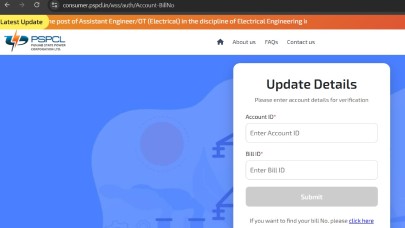
Step 2: Enter your 10-digit number in the Account ID box
Step 3: Then enter your Bill ID (the following are the steps to know your Bill ID number if you have a recent electricity bill copy to find your Bill number)
Step 4: Next page opens: “Verification Successful” and you click on Next

Step 5: You can now update details. Enter your new phone number and new email ID. Click on Send OTP.
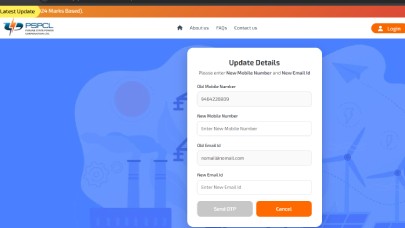
Step 6: You will receive an OTP on your phone number and email ID. Enter your OTP and click on the Verify OTP button.
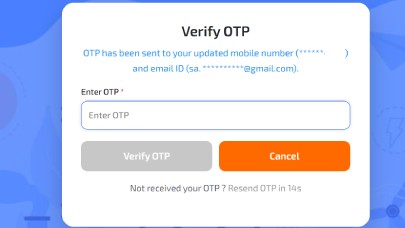
Step 7: Now your mobile and email ID details have been updated successfully.

How to know your electricity bill ID number in Punjab?
So if you don’t know your bill ID number. Here are the steps to find it.
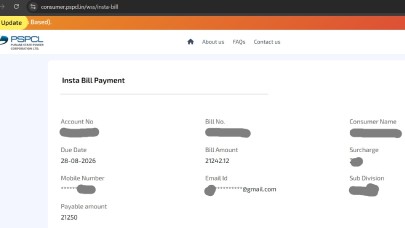
Step 1: Open this link https://consumer.pspcl.in/wss/insta-bill
Step 2: Enter Account Number and CACHAPA, and then click on Submit.
Step 3: Another page opens with all details, and find your Bill No. there
So these were some very easy steps to change your mobile phone and email ID in the PSPCL Bill.